


Momenzo: Real Estate Videos
3.925.00 Reviews
App Specs
- Version
- 4.8.1
- Updated On
- License
- Free
- Downloads
- 50,000+
- Developer
- Momenzo Ltd.
- Categories
- Video Players & Editors
- Platform
- Android
Screenshots
 Analysis by AppCompare
When I have a property to show and only a short window to make a video, I want a tool that keeps the work moving rather than turning a quick listing into a full editing project. Momenzo: Real Estate Videos is built around that practical need: making property-focused clips on a phone. It is a free video player and editing app from Momenzo Ltd., with in-app purchases ranging from $23.99 to $169.99 per item, so I would treat the free download as a way to explore the workflow before deciding whether paid options suit my routine.
Start with a story, not a shot list
The most useful way to approach a property video is to decide what a viewer should understand before you start recording. Is the home best introduced by its bright kitchen, a useful layout, or the feeling of arriving at the front door? That small choice gives the footage direction and makes editing easier. A template-based tool can help shape the finished clip, but it cannot decide what makes a particular property worth seeing; that judgment still comes from you.
For a busy agent, the appeal is less about replacing a production crew and more about making a repeatable, presentable result without moving to a desktop editor. I would use it for a rental walkthrough, a new listing announcement, or a quick social clip that points interested viewers toward a viewing. It is also a reasonable fit for an independent seller who wants something more engaging than a string of still photos but does not want to learn a complex editing suite first.
Plan a walkthrough that edits cleanly
A simple recording plan makes a noticeable difference. I would begin with an exterior or entry shot, move through the rooms in a logical order, and finish on the feature I most want a viewer to remember. Between rooms, pause briefly rather than swinging the phone in one continuous sweep. Those small pauses give you cleaner places to trim, and a consistent walking pace makes cuts feel less abrupt even before adding effects.
It also helps to record with the final viewing context in mind. A vertical composition can work naturally for a phone-first social post, while a wider view may be more comfortable for a property page or a client watching on a larger screen. I would check the framing before filming rather than assume one crop suits every destination. That is a general production choice, not a magic setting: the useful outcome depends on how you plan to share the clip.
Real estate footage needs restraint. Filters and transitions can add polish, but too much styling risks making rooms look unlike the property a visitor will see. I would keep edits focused on clarity: remove dead time, preserve a sense of how rooms connect, and use text only when it adds practical context. A short, legible label can orient a viewer; a pile of animated captions can distract from the space.
Making a listing video work from capture to delivery
I’d treat this section as the practical bridge between recording a property and getting a useful clip into someone else’s hands. A simple naming habit and a quick audience check can prevent mix-ups when several listings are in progress: decide whether the cut is for a client preview or public promotion before you finish it. That small decision helps keep the edit focused on the right details.
Worth Reading Before You Choose

EA SPORTS FC Mobile 26 Is a Bigger Football Game, but It Takes Time

Flipboard Shows What News Apps Must Do Beyond the Feed

Switching to Android Auto Means Rethinking Your Driving Routine

Google Calendar Makes a Crowded Week Easier to Manage

Ludo King Makes the Most of the Minutes Between Plans

Baby Panda World Brings Quick Play to Modern Phones, but Its Game Library Feels Busy
Getting Started with Momenzo
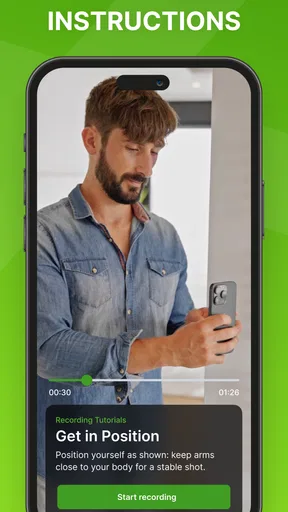
First things first, downloading Momenzo: Real Estate Videos is a breeze. Available on both Android and iOS, it's just a quick tap away from your app store. Once installed, the setup is straightforward. The interface is user-friendly, and you’ll be greeted with a tutorial that’s as intuitive as it gets. It’s like having a personal guide holding your hand through the initial steps.
Sleek and Intuitive Interface
The app’s design is sleek and modern, which makes navigation a pleasure. Everything is laid out logically, so you won’t be fumbling around trying to find what you need. The menu is straightforward, with options clearly labeled, allowing you to jump right into creating content without a hitch.
That approachable feel matters most when you are working between appointments, but I would still allow a little time to learn the editing flow on a sample clip before using it for an important listing. A practice run lets you see whether your footage needs steadier movement, tighter trims, or less on-screen decoration. The app is for Everyone, and it has a 3.8 average from 506 ratings, but ratings are only a rough signal; your own test will tell you whether its style matches the way you present homes.
Features that Stand Out
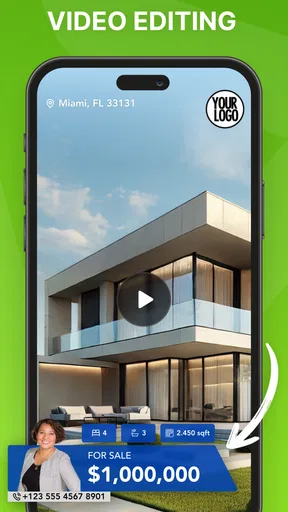
Now, let’s talk about what makes Momenzo stand out. The app offers an array of editing tools that let you craft the perfect video. You can trim, cut, and splice with ease, and there’s a rich selection of filters and effects to give your videos that extra oomph. Need to add some background music? No problem. Momenzo provides a library of tunes to choose from, or you can upload your own.
One of the coolest features is the template library. It’s a lifesaver for those of us who might not be video editing wizards. These templates are customizable, letting you add text, animations, and transitions with minimal effort. Plus, everything is designed to be mobile-friendly, which is a huge plus.
Use templates without letting them flatten your style
Templates are especially handy when you make several similar listing clips and want a consistent look. I would choose one restrained style, then keep the order of rooms and the key selling point specific to each property. That gives your feed a recognizable rhythm without making every home feel interchangeable. Before committing to a template, check how its text and transitions sit over both bright windows and darker rooms; a treatment that looks tidy in one shot may compete with detail in another.
Music is another place where a quick choice can affect the whole result. I would listen through the clip with the soundtrack on, not just pick a track because it sounds appealing on its own. The pace should support the movement, and the volume should not make the video feel louder or more dramatic than the property deserves. If a client will receive the clip directly, a clean version with minimal embellishment may be more useful than a social-first edit.
Review the cut before sending it out
Editing on a phone is convenient, but the small screen can hide problems. Before sharing, I would replay the full video and look for abrupt changes in brightness, text that covers an important feature, or a cut that makes the route through the home confusing. If possible, watch it once without sound as well: the visual story should still make sense when a viewer is scrolling somewhere quiet or has muted playback.
One practical trade-off is that a template can speed up assembly while also nudging you toward a familiar, polished look. That is useful for routine marketing, but it is not the same as fine control over every visual detail. If you need carefully matched color, precise audio mixing, detailed motion graphics, or a long-form property film, a dedicated editor on a larger screen is likely the better tool. I would choose Momenzo when pace and a coherent presentation matter more than granular control.
Effortless Sharing Options
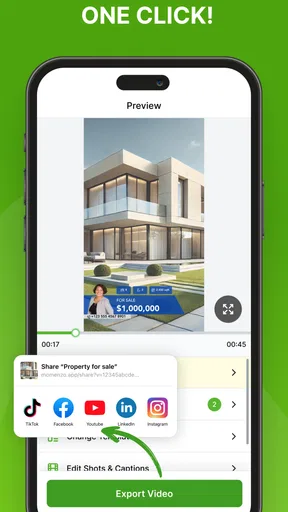
Once your video masterpiece is ready, Momenzo makes sharing a cinch. Whether you want to upload directly to social media platforms or send a private link to a client, the app has got you covered. It’s optimized to maintain quality without bloating the file size, ensuring your videos look sharp and professional wherever they’re viewed.
For a realistic day-to-day example, imagine finishing a viewing and having a second property to promote before the afternoon is over. I would capture a few deliberate clips while the rooms are ready, assemble them with a consistent template, then watch the whole edit once before sending it to the client or preparing a social post. The time saving comes from keeping the concept modest and the shot sequence clear, not from expecting the app to fix shaky or poorly framed footage after the fact.
Before handing a video to someone else, I would confirm that the recipient can open it and that the version is intended for that audience. A client preview and a public listing post do not always need identical text or pacing. Keeping a clean, broadly useful edit separate from a more promotional version can also prevent you from having to rebuild the video when the distribution plan changes.
Where it fits among editing apps
Compared with a general-purpose mobile editor, Momenzo’s property focus makes sense when the job is to turn a walkthrough into a listing-ready clip with little setup. A general editor may offer a broader canvas for unusual storytelling, precise timing, or effects that are not centered on real estate, but it can demand more decisions and time. A camera app alone is simpler for recording, yet it leaves you to assemble and present the footage elsewhere. I see Momenzo as the middle ground: more directed than recording and posting raw clips, less open-ended than building a polished film from scratch.
That middle ground will not suit everyone. If you already have an established desktop workflow, a particular brand package, or strict requirements for exact color and sound, switching to a template-led phone process may create extra steps rather than remove them. The app is most compelling for agents who value speed and repeatable listing content, especially when they are willing to make thoughtful choices about framing and edit length.
Why Use Momenzo?
So, why should you consider adding Momenzo to your toolkit? Simply put, it’s all about efficiency and quality. In the competitive world of real estate, standing out is crucial, and high-quality video content can make a significant difference. With Momenzo, you save time and effort, all while producing content that elevates your brand.
It has passed 50,000 installs, and the current version is 4.8.1, with Android 8.0 as the minimum operating-system requirement. I would still check that your phone has enough room for the footage you plan to work with and that the app runs comfortably on your device before relying on it during a packed schedule. The free starting point is appealing, but the listed in-app purchase range is substantial enough that I would inspect the available choices in the app and decide what you actually need rather than assume every useful workflow is included at no cost.
One question many agents have is whether this can replace a professional video service. For a straightforward walkthrough or a social update, it may be a practical alternative when speed matters and expectations are realistic. It is not a substitute for a planned shoot with controlled lighting, carefully staged rooms, or a distinctive property film. Another common concern is whether it works for someone new to editing: its guided, template-oriented approach is aimed at reducing that learning burden, though a short practice project remains the safest way to get comfortable.
The app was released on June 12, 2020, and Momenzo Ltd. develops it. Its central value is not that every listing needs elaborate video; it is that a focused phone workflow can make a decent property clip easier to produce consistently. If your listings benefit from visual walkthroughs and you are comfortable doing a final quality check yourself, it is worth trying. If you need full creative control or highly produced results, I would look to a more advanced editor or a videographer instead.
Moreover, the app is regularly updated, ensuring that you’re always equipped with the latest tools and features. The support team is responsive, so if you ever hit a snag, help is just a message away.
Final Thoughts
At the end of the day, Momenzo: Real Estate Videos is a game-changer for real estate professionals who want to up their visual marketing game. It’s intuitive, powerful, and designed with the busy agent in mind. So, if you’re ready to make your property listings shine like never before, give Momenzo a go. Trust me, it’s worth every pixel!
Pros
- User-friendly interface
- easy navigation.
- High-quality video output every time.
- Customizable templates for branding.
- Fast video rendering speeds.
- Great for on-the-go editing.
Cons
- Limited free features without subscription.
- Occasional app crashes reported.
- Requires stable internet for uploads.
- Limited advanced editing tools.
- Some features need in-app purchases.
FAQs for Momenzo: Real Estate Videos
What is Momenzo and how does it benefit real estate agents?
Momenzo is a mobile app designed to help real estate agents create professional-quality videos for property listings. It streamlines the video creation process with easy-to-use templates and editing tools. Agents can enhance their listings with engaging content that attracts more potential buyers, ultimately boosting sales and client satisfaction.
Is Momenzo easy to use for someone with no video editing experience?
Yes, Momenzo is designed with user-friendliness in mind, making it accessible to users with no prior video editing experience. The app offers intuitive templates and step-by-step guides, allowing users to quickly create polished videos without needing advanced technical skills.
What features does Momenzo offer for video customization?
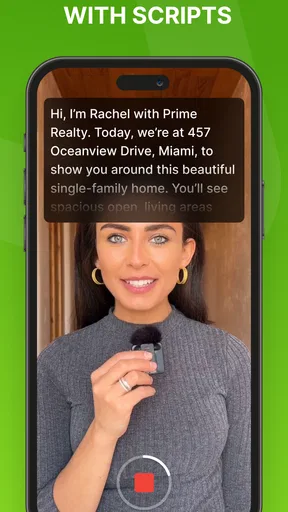
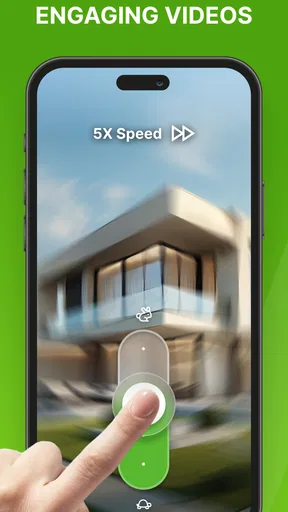
Momenzo provides a range of features for video customization, including various templates, music tracks, and text overlays. Users can also adjust video speed, apply filters, and add voiceovers to personalize their content. These features help create unique, eye-catching videos tailored to specific property listings.
Is there a cost associated with using Momenzo?
Momenzo offers a subscription-based pricing model, with different plans available based on user needs. While there may be a free trial period, ongoing use typically requires a subscription to access all features and remove any limitations on video creation and exporting.
Can videos created with Momenzo be shared across multiple platforms?
Yes, Momenzo allows users to easily share their videos across various platforms, including social media, websites, and email. The app provides options to export videos in different formats and resolutions, ensuring compatibility with popular platforms like Facebook, Instagram, and YouTube.


